Changelogs
Stay up to date with the latest changes and enhancements.
Stay up to date with the latest changes and enhancements.


07. Aug 2025
Share
 Watch the Release Notes Video
 Genius Marketing Suite – Chat Interface
We’ve reimagined the buyer experience inside Genius Marketing Suite with a brand‑new interactive chat interface that brings everything into a single, real‑time conversation flow. Whether your buyer is on mobile or desktop, they can now:
Conversational Buyer Flow – Interact with listings directly in chat: request walkthroughs, make offers, or tap Win It Now to secure a deal instantly.
Smart Walkthrough Scheduling – Buyers pick their preferred day and time from a calendar with pre‑configured windows. If no slots are available, they’re prompted with quick alternatives – no back‑and‑forth calls.
Offer Submissions, Simplified – Define a minimum offer, and buyers enter their amount and hit submit. Offers are captured instantly and synced to your deal.
“Win It Now” Option – For fast‑moving deals, give your best buyers the chance to bypass offers and lock the property with an immediate price.
CRM & Conversation Sync – Every chat message is recorded in your CRM’s conversation section so your whole team has context. Buyers also receive real‑time updates in chat.
You’re in Control – From the admin panel, choose when the chat interface is visible, set available walkthrough days and time slots, disable chat or walkthrough requests if needed, and configure a minimum offer amount.
Branding & Deal Visibility – Display your listing title right at the top of the buyer‑facing suite for a professional, branded look.
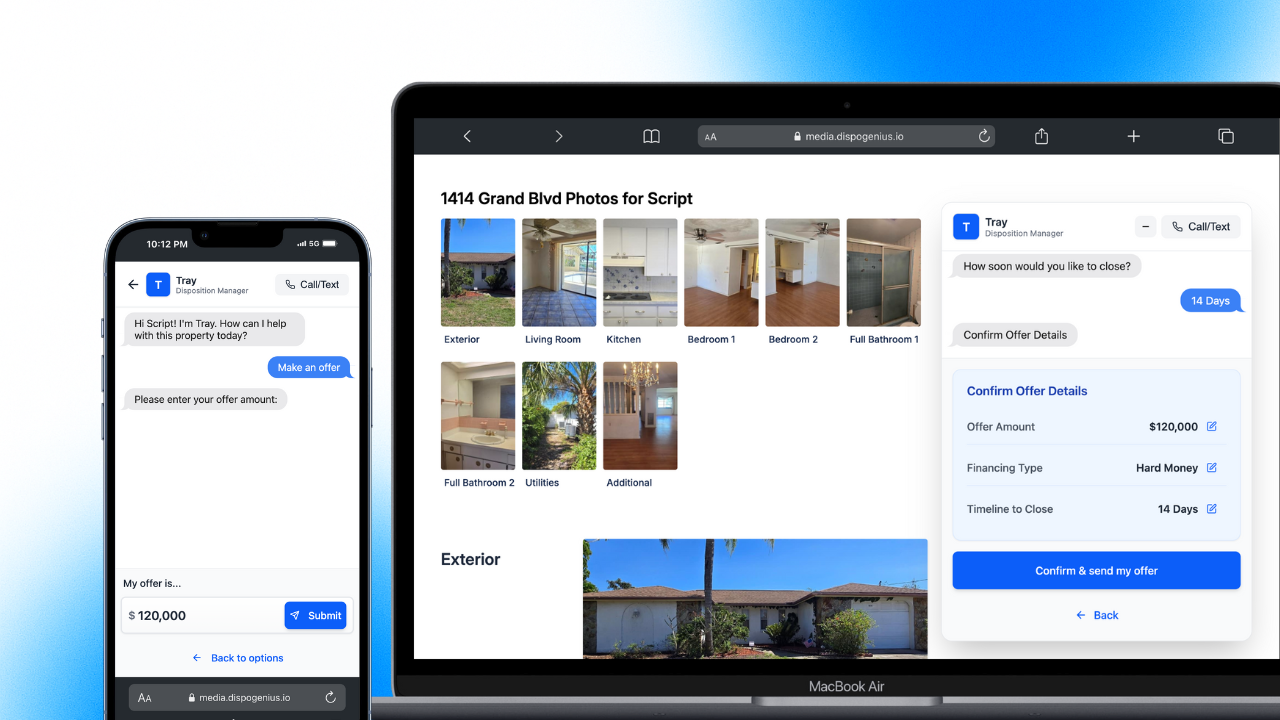
 Image 1 – Buyer chat interface showing offer submission.
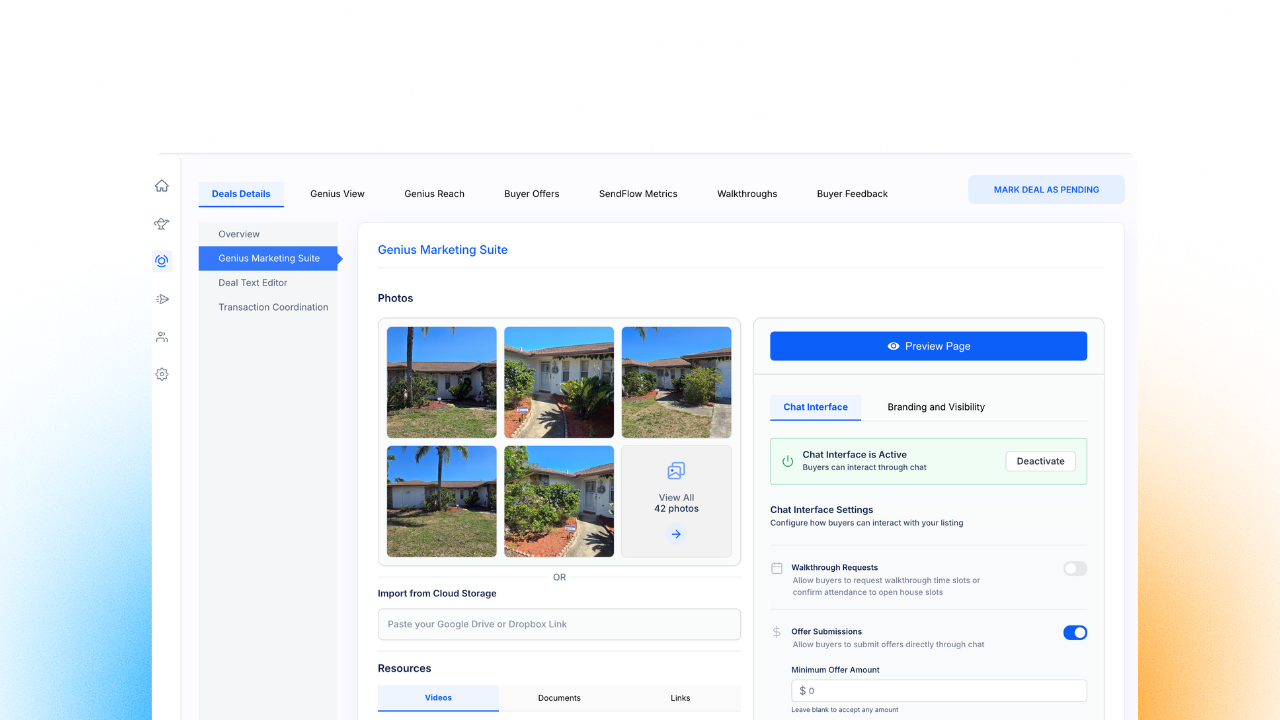
Image 2 – Admin side of Buyer chat interface.
 Genius Mode – Enhancements
Genius Mode just got a powerful upgrade, making your outreach smarter and easier:
Better Skip Tracing Accuracy – Major optimizations improve precision and reliability so you can count on higher quality leads.
Fixed: County/City Mix‑Up Bug – Buyers are now assigned to the correct location when counties share similar names across states.
Send to All Phone Numbers at Once – Reach your buyers faster by sending messages to all of their skip‑traced phone numbers in one go – no manual toggling.
Tag Management Built‑In – Apply or remove tags directly within Genius Mode to mark someone as Inactive, out of state, etc., and sync those tags to both the buyer’s Genius Profile and your CRM.
Automatic Routing in Buyer Genie – The Genius Mode toggle is gone. If you’re subscribed to Genius Mode, all searches in Buyer Genie automatically use it – no extra clicks required.
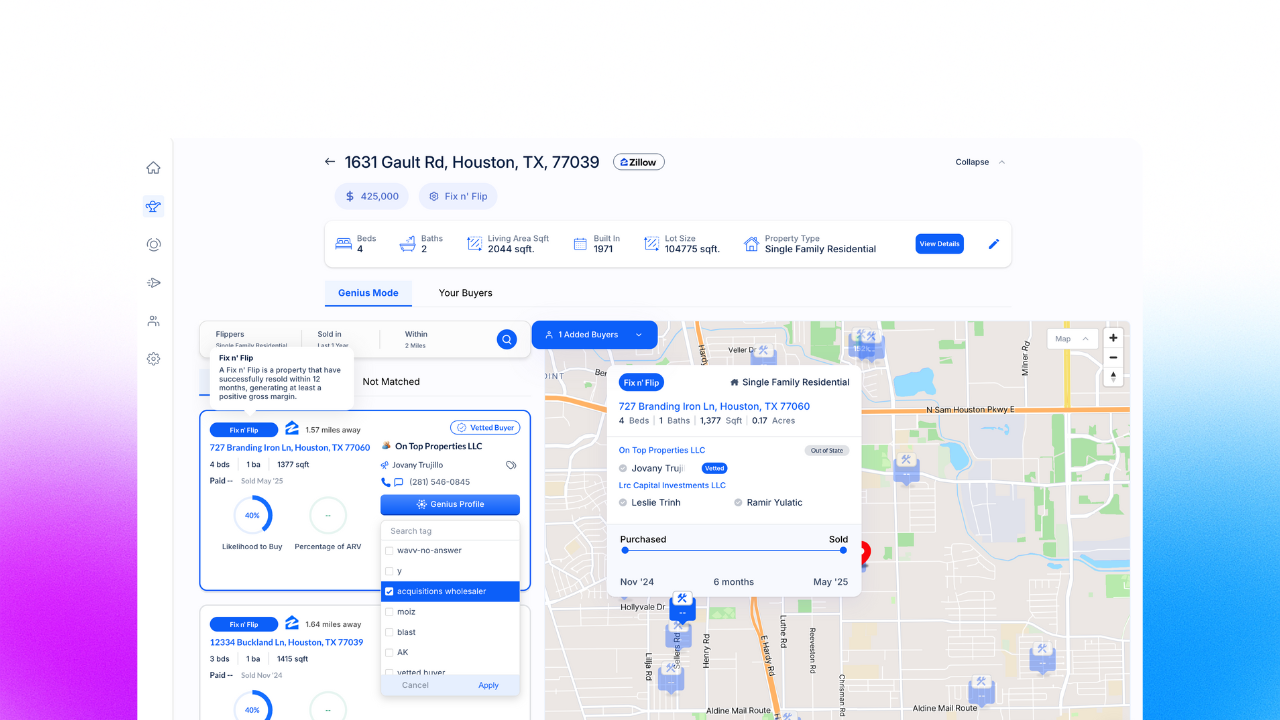
Image 3 – Tag management in Genius Mode.
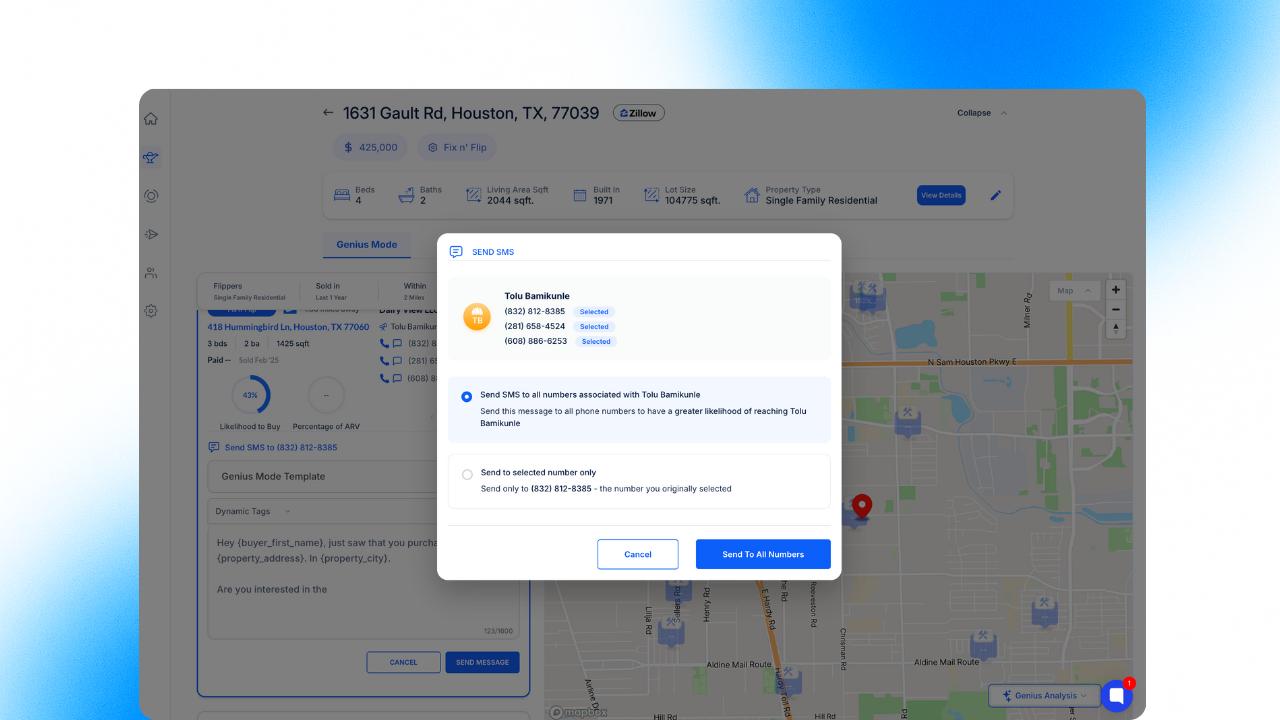
Image 4 – Multiple number messaging in Genius Mode.
 Genius Reach – Smarter Outreach, Wider Radius
Genius Reach enhancements give you more reach, clarity, and control when marketing deals:
Expandable Genius Reach Radius – Once you’ve contacted every buyer in your current radius, expand your outreach with a single click (e.g., from 2 miles to 5 miles) to uncover more opportunities.
Call‑To‑Click Count Now Visible – See at a glance how many times you’ve called a buyer (1×, 2×, 3×) before reaching out again, helping you avoid over‑contacting.
Dynamic Tag Bug Fix for Custom Messages – Dynamic tags like property address or ARV now correctly reflect your current deal when sending custom messages in Genius Reach.
Conversation History at a Glance – View past calls, texts, or emails right inside Genius Reach to understand whether a buyer has already engaged with you, mirroring the clarity of Genius Mode.
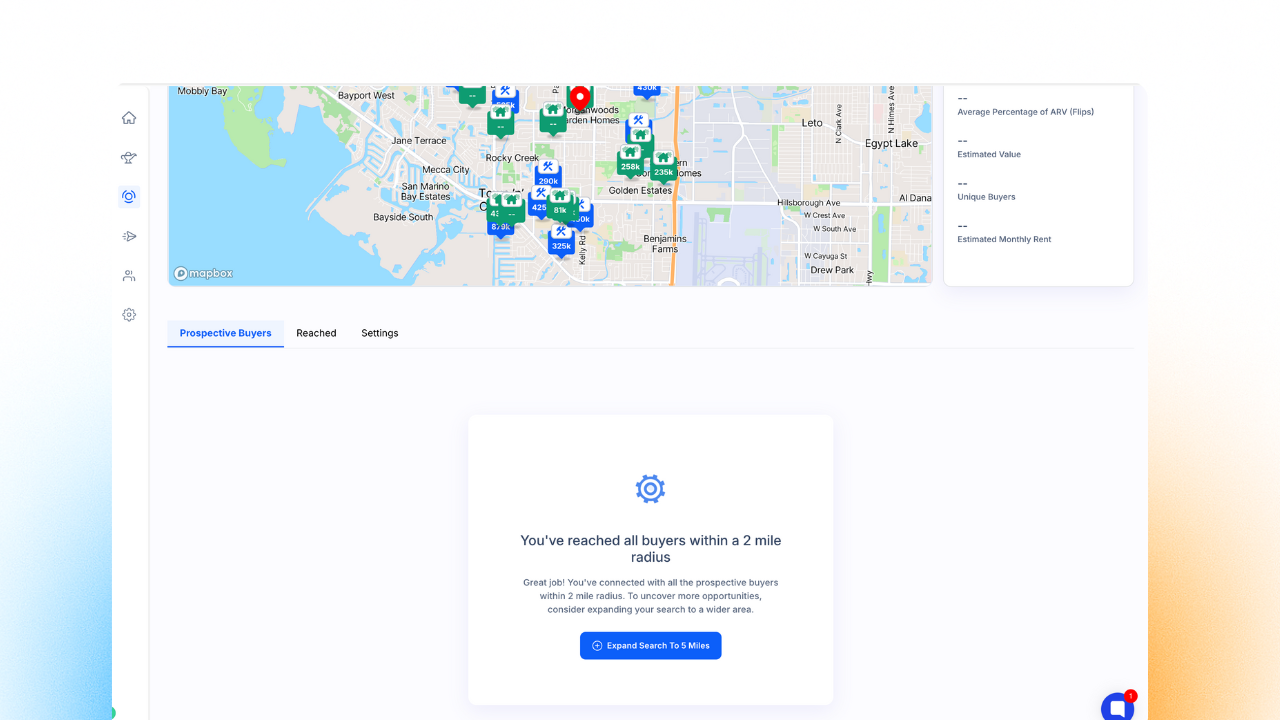
Image 5 – Genius Reach radius expansion prompt.
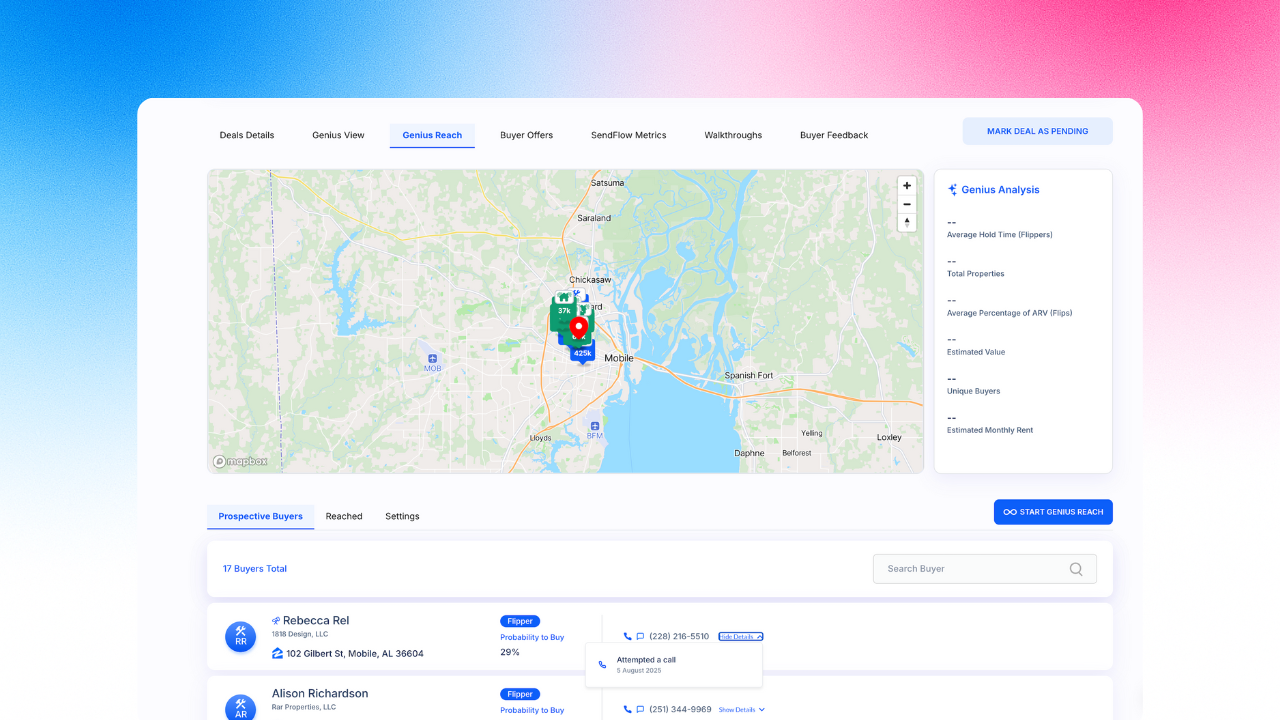
Image 6 – Conversation history in Genius Reach.
 All Deals Management – Now Smarter with “The Buyer” and “The Deal”
We’ve made a big improvement in how deal‑related data is shown inside the Genius Profile. The All Deals tab is now bifurcated into two clearly defined sections (Watch Demo):
 The Buyer – Displays all buyer‑specific information such as VIP/Vetted tags along with their Levels (1 through 5), activity status, and engagement history. See statuses like Interested/Not Interested, scheduled walkthroughs, offers received, buyer notes, and activity logs in a single scrollable view.
 The Deal – Contains detailed deal data including property address, pricing (Asking, ARV and Win-it Now), lot size, year built, occupancy status, and more. This section also shows the SMS and email messages sent to the buyer for this deal and includes notes so you keep context without leaving the view.
This bifurcation gives you a cleaner and more structured experience for managing buyer‑deal conversations, helping you act faster and stay organized – all on a single screen.
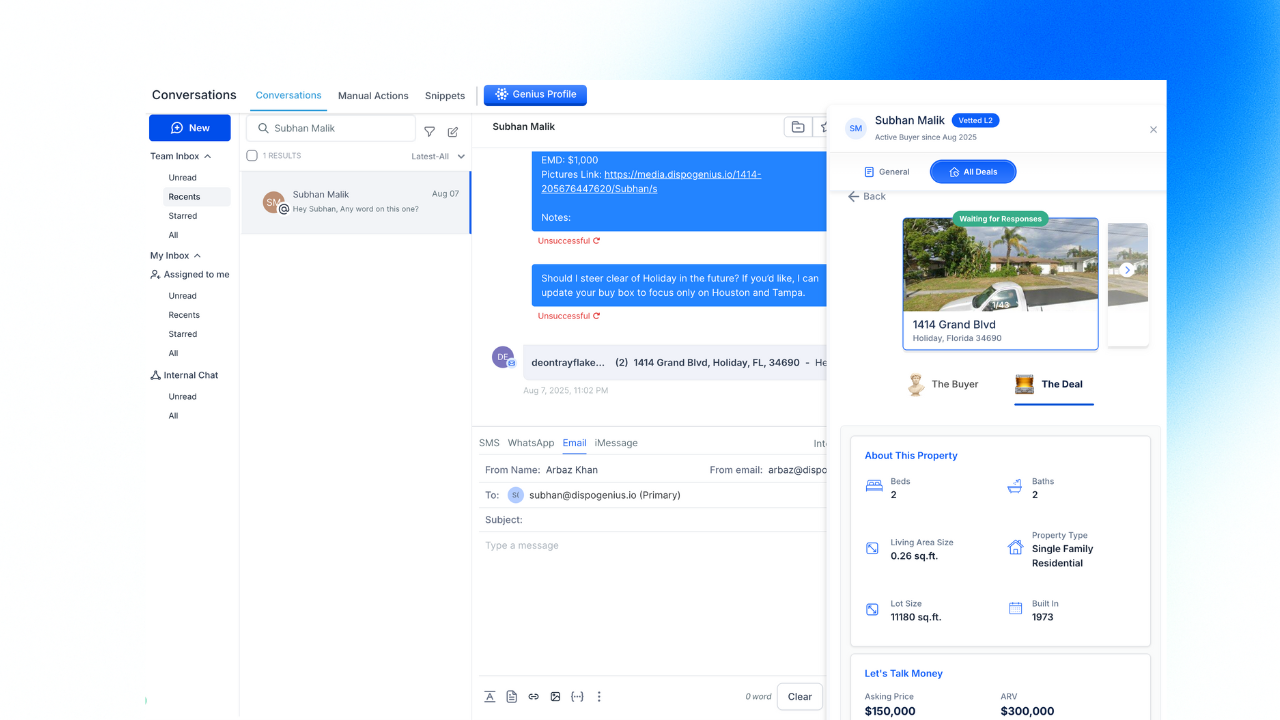
Image 7 – “The Deal” view with property details, pricing, and message history.
 Other Enhancements & Fixes
Engagement Score & Time Exclusivity – You can now set timed exclusivity per vetted buyer level (1 through 5). For example, Level 5 buyers can receive deals 20 minutes before others, and ranking for Vetted Buyers is fully functional.
Overlapping Time Slots Supported – Walkthrough appointments can now be booked back‑to‑back without needing a gap between them.
Fallback Email Fix – When a follow‑up email is sent and no “from” email is found, the system now uses the Disposition Manager’s email by default.
Genius Marketing Image Preview – You can preview images across different categories without closing and reopening the viewer in Genius Marketing Link.
Buyer Import Improvements – When importing buyers in bulk, existing data is now merged with new data instead of returning duplicate errors.
Platform Security Boost – Major improvements to app‑wide security with enhanced authentication and protection of sensitive data.
 What’s Next – Upcoming Features
Deal Activity Notifications Everywhere – Notifications section is moving to the top header of your CRM (GHL level), so you never miss important updates.
SendFlow Personalization Revamp – We’re undertaking a major upgrade to SendFlow to add more variety and personalization in messages, eliminating repetitive patterns and boosting send speed.
Manual Bio Entry in Genius Mode – Soon you’ll be able to manually add contact names and details for properties where skip tracing doesn’t return results.
Email Click Count Tracking – See not just if a buyer opened an email, but how many times they engaged with it.
Custom Deal Checklists – Create and save task checklist templates tied to specific deals so you never miss a step before sending a deal.
Duplicate Deal Prevention – We’re implementing checks to prevent users from creating multiple deals for the same address.